Digital business cards have changed the way professionals introduce themselves. You no longer have to spend minutes explaining who you are when meeting someone at an event or a meeting.
With a single QR code scan, people can gather your company and personal contact details—phone numbers, email addresses, social links, and more.
The best part? You don’t have to create digital business cards from scratch. A digital business card generator like mobiQode helps you get started in minutes.
But even with the best tools, you’ll likely need some inspiration to kickstart the process. This post covers the top digital business card examples across industries to help you create yours faster.
Top 7 digital business card examples
1. Graphic designer digital business card
A digital business card for a graphic designer must highlight three crucial aspects:
- URL to the online store where the designer sells their work
- URL to the portfolio showcasing their past projects
- Email address that encourages prospects to reach out directly
In addition to these, your digital business card can also include a dynamic QR code. This allows users to scan the code and gather more information about the designer instantly.
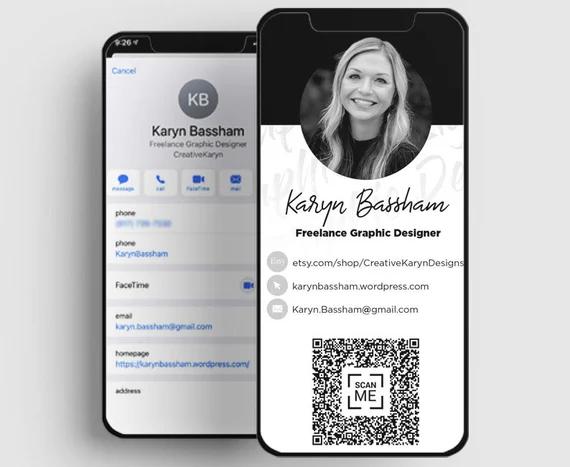
Source: Etsy
2. Digital marketer business card
Marketers can share their consulting landing pages or profile links on social media platforms like LinkedIn through their digital business card.
If marketers are part of an agency, they can add the URL to the business website as well. This makes it easy for prospects to check the services the marketing agency offers.
3. Photographer digital business card
The best digital business card for creatives allows prospects to understand who you are, where you’re from, how others can get in touch, and view your diverse portfolio.
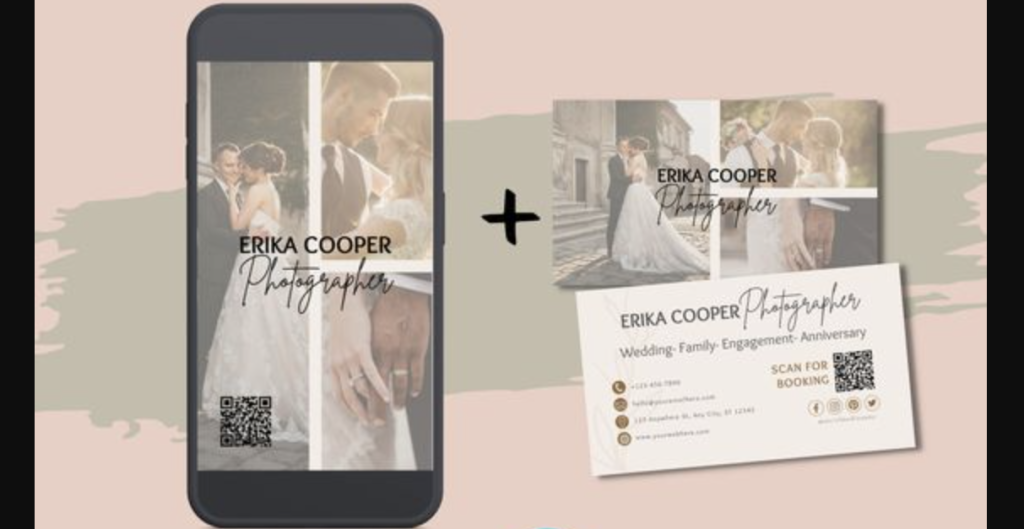
Source: Pinterest
If you run a studio that offers services for multiple occasions—weddings, engagements, anniversaries, birthdays—add your business logo to the card. If you work solo, add your picture instead. It helps people remember who you are and put a face to your name.
4. Catering company digital business card
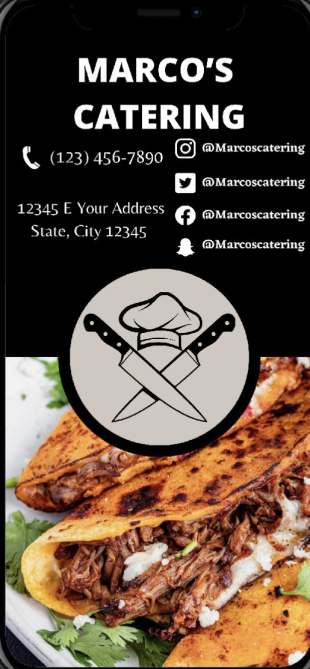
Here are the main contact details catering companies should include in their digital business cards:
- Your brand and logo to let everyone know who you are
- Social handles to help people explore your menu and share feedback
- Phone number to connect with you and place an order
- Address in case you do not offer drop-off services
If you run a cloud kitchen, remove the address section and use that space to share a QR code that leads people to your menu. You can do that using a QR code generator like mobiQode.
Source: Etsy
Create Your Digital Business Card — Free for 14 Days
Start Free Trial →5. Realtor digital business card
A realtor meets multiple clients every day, which means they have to introduce—and sometimes reintroduce—themselves several times. A digital business card streamlines this entirely. All they have to do is show their card and ask people to scan the QR code to learn more.
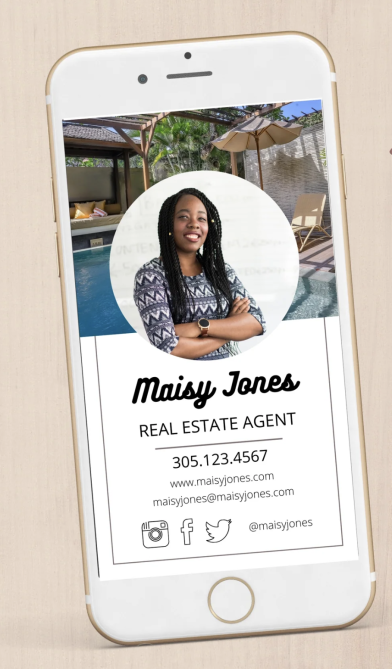
The essential details a realtor’s business card must cover:
- Name and designation
- Phone number
- Website link (especially if you have multiple properties to showcase)
- Social handle links
- Your business logo or a picture (optional)
Source: Double Brush
6. Company owner digital business card
These can be tricky to create from scratch because there’s a lot of information to include:
- Founder’s name and designation
- Company logo
- Company address
- Company website
- Social handles like X and LinkedIn
- Scannable QR code
With all these details included, founders can ensure that people understand both them and their business offerings at a glance. Adding a QR code linked to the company website lets people explore primary offerings in depth.
7. Corporate lawyer digital business card
Attorney business cards need to convey credibility and accessibility. A digital business card for lawyers can include:
- Picture and name of the attorney
- Designation and location
- Phone numbers and email address
- About me section highlighting years of experience in specific practice areas
- QR code linking to a list of cases or client testimonials
For social handles, adding a LinkedIn profile is usually sufficient. This completes the attorney business card and makes it readily available for professional sharing.
What makes a great digital business card
Now that you’ve seen great digital business card examples, let’s talk about what actually makes one stand out. A great digital business card is all about clarity, consistency, and connection:
- Professional photo or logo: A face or logo adds instant recognition. People remember visuals better than names alone
- Role and contact info: Keep it short and relevant—name, designation, phone, and email
- Social links and websites: Let people explore your professional world. Add links to LinkedIn, Instagram, or your portfolio
- Custom CTA: Don’t just share info—invite action. Include CTAs like “Book a Meeting” or “View Portfolio”
- Branded colors and layout: Use your brand palette and typography for a polished, credible look
How to create a digital business card in mobiQode
Once you’ve mapped out what to include, here’s how you can create your digital business card in mobiQode in minutes:
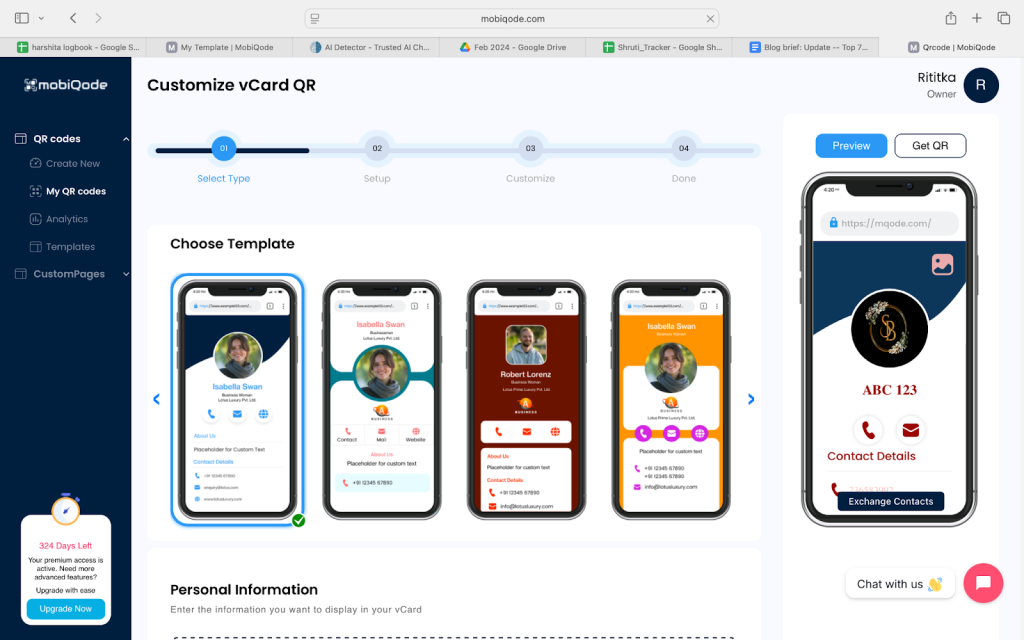
Step 1: Choose a template or start from scratch
Pick a template that fits your line of work, or personalize your landing page and QR code from scratch.
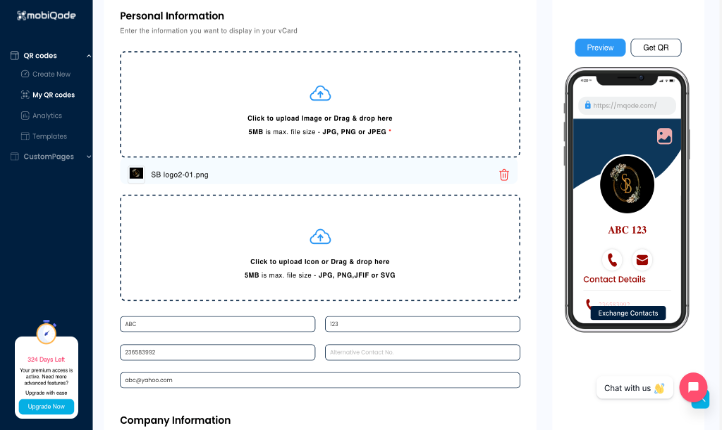
Step 2: Add your info and logo
Enter your name, position, contact information, and upload a profile photo or brand logo.
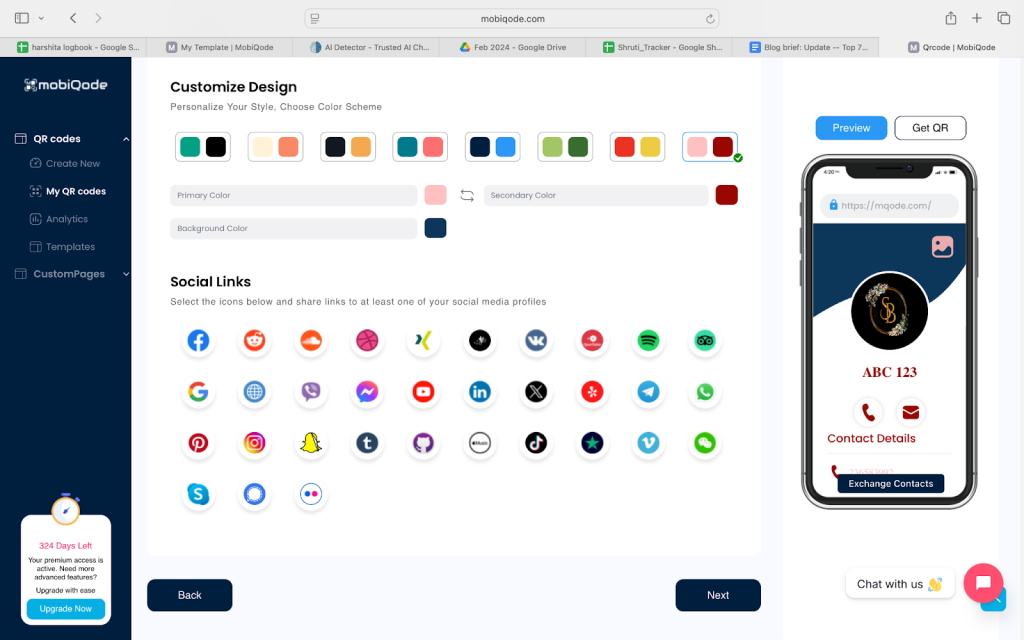
Step 3: Customize the color scheme and CTA
Make sure your card reflects your brand style—whether bold, minimal, or creative.
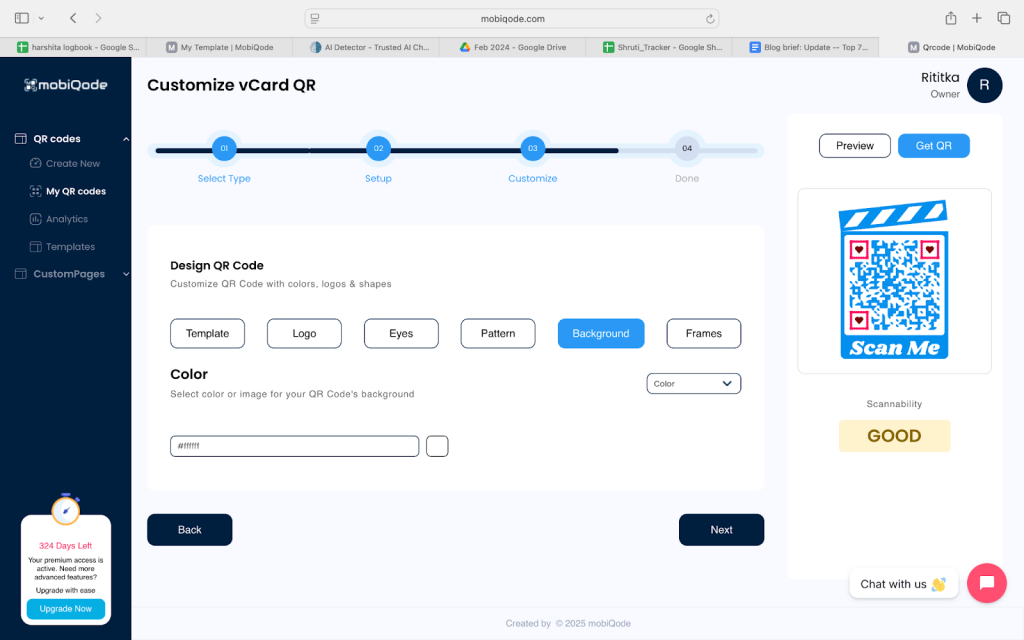
Step 4: Customize your dynamic QR code
Dynamic QR codes are editable anytime, so you can update details without re-sharing your card.
Step 5: Preview and publish
Once your digital business card looks perfect, share it via link, email, or scan.
mobiQode — Create Your Digital Business Card Free
Start Free Trial →Features that make mobiQode’s digital business cards stand out
Two-way contact sharing
With mobiQode, networking becomes a two-way street. Recipients can instantly share their own contact details right from your card through built-in lead capture forms. You can customize the form fields—name, email, company, or inquiry type—to get exactly what you need. Perfect for freelancers, agencies, and event marketers.
Apple Wallet and Google Wallet integration
mobiQode lets you save your digital business card directly to Apple Wallet or Google Wallet for instant access. Professionals who network often can share their QR code with just a tap—even when offline.
Real-time analytics dashboard
mobiQode’s analytics dashboard lets you track your card’s performance in real time. See devices, locations, total scans, and repeat visits. Determine which events bring in the most interaction and double down on strategies that work.
Dynamic QR codes
All mobiQode cards use dynamic QR codes, so your information stays current. Change your CTA, links, or contact information anytime without reprinting or redistributing.
Custom landing pages
Each mobiQode digital business card comes with its own customizable landing page. It’s mobile-friendly, brandable, and built to convert. Add CTAs like “Book a Meeting,” “Request a Quote,” or “Follow Me on LinkedIn”—it’s your personal mini-website, optimized for action.
Team templates for businesses
For teams and organizations, mobiQode offers branded templates that ensure consistency across all employee cards. Each team member can personalize their details while keeping the same company look and feel.
Where to use your digital business card
Email signatures
Add your mobiQode card’s QR code to your email signature so every message becomes a connection opportunity. Clients can scan it to save your details instantly. A small business owner, for example, can turn every outgoing email into a lead generation touchpoint.
LinkedIn or Instagram bios
Place your QR code business card link in your bio. This lets followers learn more about you instantly. For marketers and freelancers looking to drive traffic to their booking page, it’s a powerful move—and you can update the linked content anytime without changing the bio.
Resumes or pitch decks
Add your mobiQode QR code to your resume or pitch deck. Recruiters or investors can scan it to view your portfolio, LinkedIn, or case studies. One scan tells your full story without cluttering the document. A startup founder, for instance, can include it in a pitch deck to instantly share a demo video or company website.
Product packaging for creators
Creators and small business owners can print their digital card QR code on packaging or inserts. Customers scan it to view your product line, follow your social media pages, and sign up for updates. mobiQode tracks every scan so you can see which products drive the most interaction.
Event banners and roll-ups
Display your mobiQode QR code on event banners at conferences or trade shows. Visitors scan to access your website, contact form, or special offers in seconds. Analyze scan data afterward to see which event or booth brought the most leads.
Business proposals and client presentations
Include your digital business card link at the end of your proposal or presentation. Clients can scan it to book a follow-up or explore your services—keeping conversations going after the meeting ends.
WhatsApp and marketing campaigns
Add your mobiQode card link to WhatsApp messages or email newsletters. When recipients scan or click, they reach your booking form or social pages. It’s a simple way to boost conversions and measure how many people interact with your campaigns.
Build your digital business card today
Digital business cards are a game changer for professionals—they help you introduce yourself to prospects quickly and efficiently. These virtual cards can be shared via email, WhatsApp, simple scans, and more.
The benefits are clear: share information in bulk, achieve contactless delivery, enable two-way contact sharing, and track every interaction with analytics.
mobiQode offers a digital business card generator that helps you create fully customized cards with custom URLs, dynamic QR codes, detailed analytics dashboards, and more. Sign up for a free trial and start building your card today.
In today’s digital world, your business card should be as smart as your business. Digital cards aren’t just eco-friendly—they’re the future of professional networking.
Founder, mobiQode
Create Your Professional Digital Business Card
Start Free Trial →14-Day Free Trial · Plans from $3/mo · No Credit Card Required