Every time someone scans your digital business card, it lets you see who’s interested in you or your work. Whether you’re meeting people at an event or sharing your card online, knowing who scanned it—and when—can change how you connect.
With mobiQode’s dynamic QR codes, you can track every scan in real time, see where it came from, and understand how people engage with your profile. These insights help you spot real interest, follow up effectively, and see what’s working.
Why you should track your digital business card
Switching from paper to contactless business cards doesn’t just make sharing easier—it lets you see how people interact with you. Every scan gives you valuable data about who’s engaging, where your leads come from, and what captures their interest.
By tracking your card, you can:
- See which channels drive interest—whether it’s a trade show, email signature, or printed QR code
- Spot who’s engaging the most and follow up while interest is fresh
- Learn which message or link earns the most clicks
Static vs dynamic QR codes: why it matters for tracking
Not every QR code for business cards works the same way. Once created, static QR codes cannot be changed—they always lead to a single, permanent link. If your contact information changes, you need to create a new code from scratch.
Dynamic QR codes, on the other hand, are built for tracking. Every scan is recorded with details like time, location, and device type—and you can update your linked information at any time. mobiQode uses dynamic QR codes by default.
Consider this: at a conference, you distributed your QR code business card. With a static QR code, it still points to your old website you revamped last week. You can’t change it, see who scanned it, or know if anyone followed up.
Now imagine a dynamic QR code. You update the link in seconds to your new portfolio page, and your dashboard shows 42 scans—most from San Francisco—right after your panel session. You know exactly where your leads came from and can follow up while interest is still fresh. You can also target future campaigns to that location to capture more leads.
Track Every Scan on Your Digital Business Card
Start Free Trial →What you can track with mobiQode’s QR code analytics
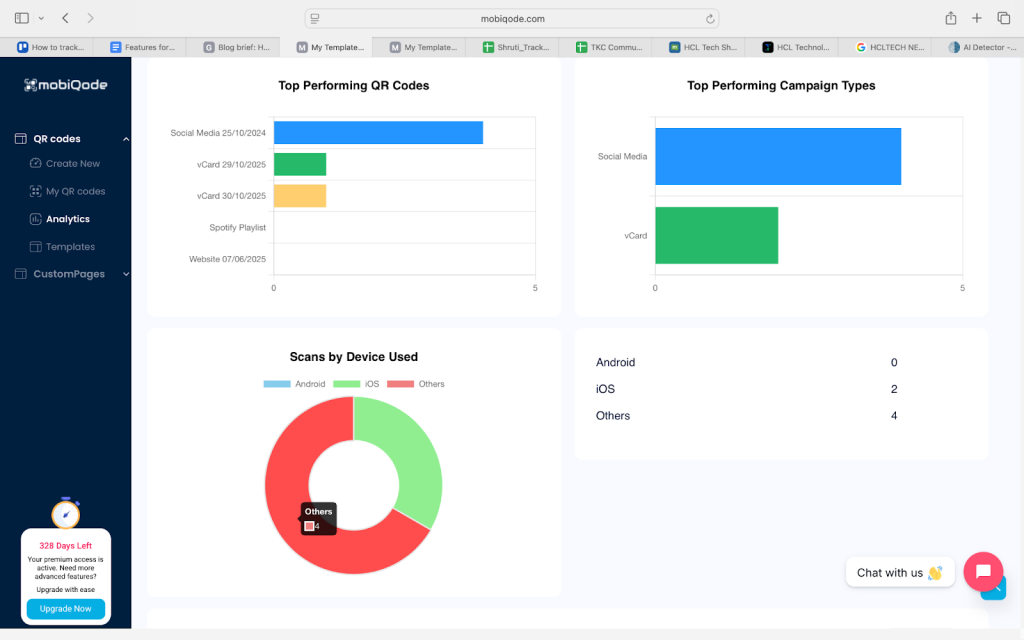
mobiQode doesn’t just tell you that someone scanned your QR code. It breaks the behavior down into clear, actionable metrics so you can act on real interest.
Total scans
This is your raw reach—the fastest way to see whether a campaign or event had traction. If scans jump after an email blast or a talk, you know the touchpoint worked.
Unique vs repeat scans
Unique scans show new people discovering you. Repeat scans show returning interest. High unique scans mean good discovery; high repeat scans mean growing intent. Use this to decide whether to nurture a lead or push a conversion CTA.
Scan location
See the cities or regions where scans happen. This helps you optimize event travel, local ads, or regional follow-ups. If most scans came from one city after a meetup, prioritize outreach there first.
Device information
Know whether scanners use iOS or Android. This matters when you tailor instructions—like saving to an iPhone contact card or adding to an Apple Wallet—or when you test mobile-specific features.
Top-performing cards
If your team uses multiple card templates or campaigns, compare performance side by side. Understand which job title, headline, or CTA gets more scans, and which card converts better at trade shows vs LinkedIn outreach.
Conversion data
Track what happens after the scan: CTA clicks, link opens, or form submissions. This ties scans to real outcomes. A spike in scans with low conversions signals a mismatch between interest and the landing experience.
Lead capture forms
mobiQode lets you collect contact info right on the card page, turning anonymous scans into contactable leads. Combine form submissions with scan metadata (location, time, device) and you get a contact plus context—useful for timely, personalized follow-ups.
Why tracking your QR code scans matters
Tracking your QR code business card is about understanding what’s working behind every interaction. When you see how, where, and when people scan your card, you turn casual networking into measurable marketing insight.
- Bridge offline and online marketing: Find out which printed cards, booth banners, or event screens actually drive people to your page
- Measure performance: See which card designs, links, or placements get the most engagement
- Optimize in real time: Update your details, offers, or CTAs instantly without reprints or wasted cards
- Prove ROI: Back up your networking or event presence with hard data, not assumptions
For example, say your card was scanned 50 times at a trade show and 10 people filled out your form. That’s a 20% conversion rate—a clear sign your setup worked. With data like that, you can double down on what performs best and refine the rest.
mobiQode — Track Scans, Capture Leads, Prove ROI
Start Free Trial →Turn every scan into an opportunity
Every scan on your digital business card is a potential conversation waiting to happen. By tracking those scans with mobiQode’s dynamic QR codes, you get real-time insights that help you connect better and follow up faster. From knowing which event brought the most leads to understanding what content got attention, tracking helps you make every interaction count.
Start using mobiQode’s trackable digital business cards today.
Data turns networking from guesswork into strategy. When you can see who scanned your card and when, every follow-up becomes smarter.
Founder, mobiQode
Track Every Scan on Your Digital Business Card
Start Free Trial →14-Day Free Trial · Plans from $5/mo · No Credit Card Required