Do you need to share a PDF but don’t know the best way to do it? QR codes are becoming increasingly common in everyday life — from restaurant menus to payments. The use of QR codes has broadened so much that businesses and individuals now use them to share documents, work files, and presentations instantly.
In this guide, we will show you how to turn your PDF file into a QR code and why it will be a great decision for your business.
PDF QR Code Generator — Share Documents Instantly
Start Free Trial →What is a PDF QR Code?
A PDF QR code is a scannable image that instantly directs users to a digital PDF file. Once you scan it using a camera or a QR code reader, the linked document automatically opens, eliminating the need for manual URL entry.

PDF QR codes enable instant sharing of reports or presentations, regardless of file size or recipient’s email limitations. Given its popularity, 82% of businesses have adopted PDF as their primary document storage format — yet sharing PDFs still comes with friction:
- Large PDF files can’t be sent via email
- Long, complex URLs lead to typos when manually entered
- Difficulty accessing files across different devices or platforms
- Version control issues when multiple copies are circulating
- Security concerns when sharing sensitive documents publicly
By choosing to generate a QR code for PDF, you streamline access and enhance the sharing experience across all devices.
Benefits of QR Codes for PDF
Instant Access
PDF QR codes supercharge document sharing by providing immediate access with a quick scan — no more typing long URLs or searching through crowded email inboxes. At a conference, instead of scrambling for a brochure, you direct someone to scan a QR code and they have a comprehensive PDF on their device in seconds.
To maximize this benefit, place QR codes on business cards, event flyers, product packaging, or billboard advertisements. Pair each code with a clear call-to-action such as “Scan for our full catalog” or “Get the complete report here.”
Reduced Email Clutter
Email inboxes are often overflowing with attachments, making important documents hard to find. By sharing documents via QR codes instead of email attachments, you keep inboxes tidier and bypass attachment size limits. A marketing team can use a single QR code linked to the latest campaign PDF — everyone accesses the most current version without wading through a sea of emails.

Version Control
With a dynamic QR code, you don’t have to create a new QR code for a PDF each time you update it. Simply update the linked file — the QR code stays the same but always points to the latest version. This eliminates the confusion that arises from multiple outdated copies circulating.
Enhanced Print Material
PDF QR codes bridge the gap between physical and digital media. A product manual can cover primary usage in print while a QR code links to a PDF with advanced features, troubleshooting guides, or instructional videos — saving on printing costs and providing a richer user experience.

Use QR codes to provide value-added content: expanded product information in brochures, interactive elements in educational materials, digital-only coupons in advertising flyers, or behind-the-scenes content for event programs. Ensure the linked PDFs are mobile-optimized, as most users will access them on smartphones.
Eco-Friendly
By providing digital access to documents that would otherwise be printed, PDF QR codes reduce waste significantly. A large corporation that regularly distributes policy updates to thousands of employees can replace printed memos with a single QR code, saving reams of paper and reducing carbon footprint.
Cost-Effective Distribution
PDF QR codes significantly reduce the costs associated with document distribution. A government agency could cut costs by providing PDF forms and informational booklets via QR codes rather than printing large quantities that may quickly become outdated. Use dynamic QR codes that allow you to change the linked PDF without creating a new code, saving on reprinting costs for physical materials.
Improved Accessibility
PDF QR codes can significantly enhance document accessibility. Optimize the linked PDF for screen readers with proper headings and alt text. Ensure the hosting platform adheres to WCAG guidelines and consider offering multiple format options through your QR code, such as HTML versions of the content for users who prefer alternatives to PDF.
Location-Based Information
PDF QR codes excel at providing context-specific information based on physical location. A museum using QR codes next to each exhibit allows visitors to access detailed PDF guides about specific artifacts. In a retail setting, QR codes link to product manuals or assembly instructions right where customers need them most.

Track, Measure, and Optimize PDF Engagement
Earlier, you shared your PDF hoping it was seen. mobiQode’s PDF analytics changes that entirely. With dynamic QR codes, you get access to data like:
- Number of scans
- Number of unique users
- Scans by city
- Scans by location and device type
Marketing can see which channels generate interest. Sales can see which materials work with prospects. HR can track onboarding engagement. Operations can see how well people are using new information. A static document comes to life with a pulse.
Keep Your PDFs Always Up-to-Date
One major problem with traditional PDFs is that changes require redistributing the updated file. A dynamic QR code changes that. The QR code stays the same, but you can update the linked file at any time without sharing the file again. This is especially valuable for pricing sheets, menus, product manuals, or any document that changes regularly.
Convert PDF Downloads into Lead Generation
Most organisations create valuable PDFs — whitepapers, 1-pagers, guides, and catalogs — but keep them as passive documents. A PDF QR code with mobiQode solves this. You can turn your PDFs into downloadable resources that:
- Route through a branded landing page
- Capture a name and contact information
- Segment users by what they engage with
- Trigger follow-up campaigns automatically
This changes the PDF’s nature — it becomes an exchange rather than a static resource. The reader gains information. Your business receives signals of intent.
How to Create a PDF QR Code
You can watch the video below or follow the steps to create a PDF QR code from scratch.
Sign In to mobiQode PDF QR Code Generator
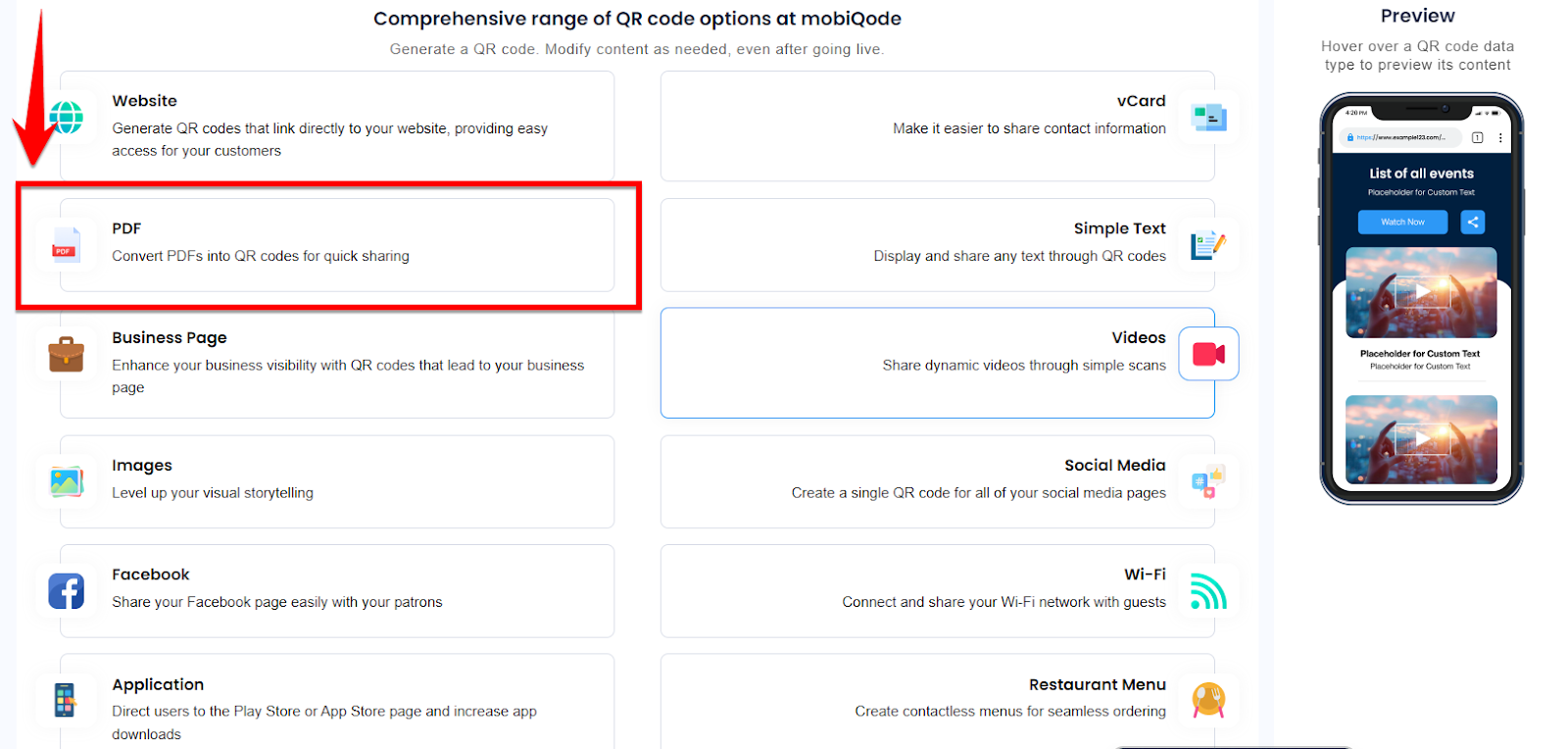
Visit mobiQode and sign in using your email, Google, or Facebook account. When you reach the dashboard, choose PDF as your data type to create a PDF QR code.
Upload Your PDF File
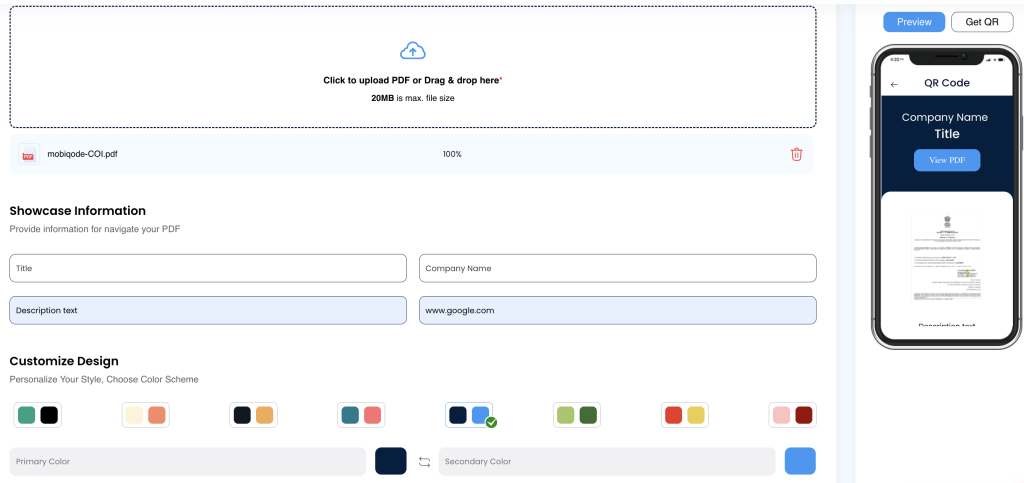
You will be taken to a page asking you to upload or add the link to your PDF. Upload your file or paste the URL of your hosted document.
Customize the Look and Feel
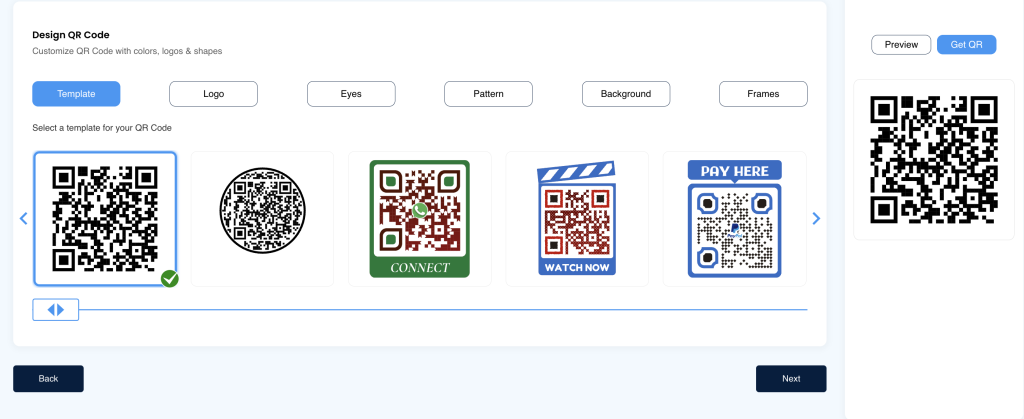
Customize your QR code with your brand colors, logo, shape, and frame. This not only makes the code visually distinctive but makes it easier to identify at a glance.
Download, Test, and Share
Download in your preferred format — JPG, PDF, SVG, or PNG. Before using it anywhere, scan the code on your phone to confirm it opens the correct document. Then deploy it on your marketing materials, documents, or website.
Static vs Dynamic PDF QR Codes
Static PDF QR codes embed a fixed link to your PDF. Once created, the URL is permanent — ideal for share-only materials. These are simple to create: upload your document and generate your QR code in minutes.
Dynamic codes offer flexibility by letting you update the target PDF without reprinting the code. You can swap the document behind the scenes — ideal for updated manuals or catalogs. Dynamic codes also support tracking, analytics, and branding. Learn more about trackable QR codes.
Industry Use Cases for PDF QR Codes
Here are 6 industries where PDF QR codes make a measurable difference:
- Restaurant Menus: No hassle of printing multiple menu cards — customers access the menu with a simple scan on their phone.
- Medical Consent Forms: Patients can access consent forms directly by scanning a QR code at reception, without manually typing URLs or downloading files.
- Event Programmes: Organisers place a QR code at entry points or on tickets, allowing visitors to instantly view the full agenda, timings, and speaker list on their phones.
- Product Manuals: A QR code lets customers access the PDF manual directly, saving printing costs and keeping packaging minimal and clean.
- Brochures: Businesses paste a QR code on posters, packaging, or ads. At an exhibition stall, visitors scan to view a product catalogue instantly.
- Education Handouts: Teachers display a QR code on the board — students scan to download lecture notes or worksheets directly to their devices.
Conclusion
Creating a QR code for a PDF is a practical move for your marketing and business purposes, and mobiQode’s PDF QR Generator makes it straightforward. With mobiQode, you get:
- Dynamic QR codes: Real-time updates to previously created QR codes. No reprinting required.
- Scan analytics: Track total scans, unique users, location, and device type for each QR code.
- Multi-URL landing pages: Add more than one link to a QR code through personalized landing pages.
- Custom design: Brand colors and logo make your QR codes recognizable and professional.
- GDPR-compliant security: Your data is always safe and secure.
- High-quality print resolution: Every QR code stays sharp no matter the size or format.
QR codes are the bridge between the physical and digital world. We’re making it simple for everyone to create, share, and connect.
Create PDF QR Codes — Share Documents with a Single Scan
Start Free Trial →14-Day Free Trial · Plans from $5/mo · No Credit Card Required
Frequently Asked Questions
How do I create a QR code for a PDF?
Upload your PDF to mobiQode, generate a dynamic QR code, and download it for use. This lets you share your PDF instantly via a simple scan — no email attachments or long URLs needed.
Can I update the PDF after printing the QR code?
Yes, with mobiQode’s dynamic QR codes, you can replace or update the PDF anytime. The printed QR code remains the same, but the linked content changes immediately.
Do PDF QR codes expire?
PDF QR codes on mobiQode do not expire as long as your plan is active. You can also control availability and disable access manually if needed.
What file size can a PDF QR code hold?
The QR code itself stores a link, not the file, so there is no file size limit built into the code. The PDF is hosted online and accessed via the link — mobiQode’s upload limits apply to the hosted file.
Can I track who scanned my PDF QR code?
Yes, mobiQode provides analytics including scan count, location, and device type. This helps you measure engagement and optimise your campaigns based on real data.