


Square QR codes have been useful for a long time, but now there’s a new option: Circle QR codes.
Circular QR codes are functional and visually appealing, and they can help you stand out in a sea of similar-looking square QR codes. Here’s everything you need to know about round QR codes, including how to create one.
What Is a Circle QR Code?
A circle QR code, as the name suggests, is circular. These QR codes are a variation of traditional QR codes where the usual squares are replaced with circles. They work the same way as a regular QR code.
Circular QR codes can be used for marketing and product packaging. While Denso Wave initially created QR codes in a square shape for functionality, they have since evolved into various shapes and sizes.
When to Use a Circle QR Code vs Standard QR Code
Choosing between a circle QR code and a traditional square QR code depends on your use case, branding needs, and scanning requirements.
| Criteria | Circle QR Code | Standard QR Code |
|---|---|---|
| Aesthetics | More visually appealing and modern; aligns well with brand identity | Functional but less visually distinctive |
| Packaging | Ideal for product packaging where design consistency matters | Suitable for basic packaging with minimal design focus |
| Print Materials | Works well on brochures, posters, and business cards with premium layouts | Commonly used in high-volume or cost-focused print materials |
| Digital Use | Effective for social media, landing pages, and branded campaigns | Widely used for general-purpose links and quick sharing |
When marketing and design are involved, use circle QR codes. When maximum scan reliability under every scenario is critical, use conventional QR codes.
Creating Your Customizable Circle QR Code
You can generate your customized QR code using any QR code generator. Choose a generator like mobiQode that has the option to generate round QR codes. Use the following steps:
1 Visit mobiQode and Log In
Visit mobiQode’s site and log in to your account. If you don’t have one, you can create a free account.
2 Choose the Type of QR Code
Once logged in, visit your account dashboard and choose the type of QR code you want to generate. mobiQode has around 12 options, from a digital business card to a restaurant menu.
3 Enter the Relevant Information
Enter the relevant information needed to create your QR code — the URL, text, contact details, or other content depending on the code type selected.
4 Customize Your QR Code
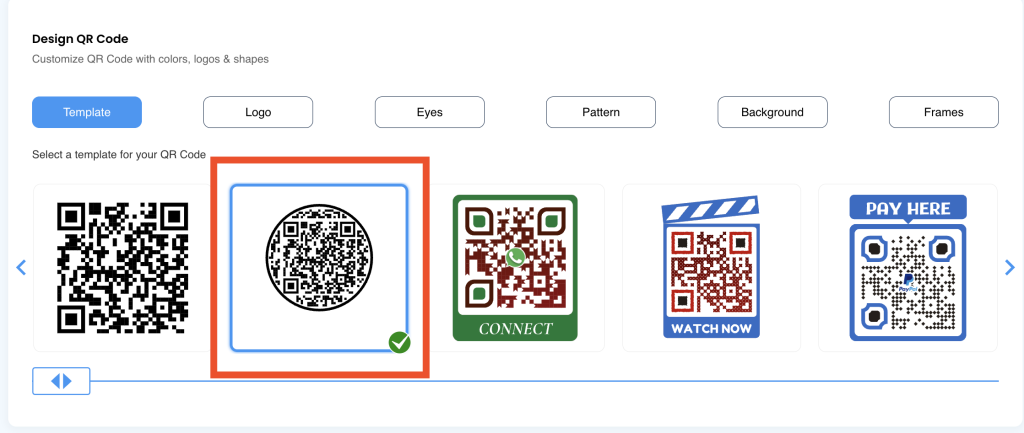
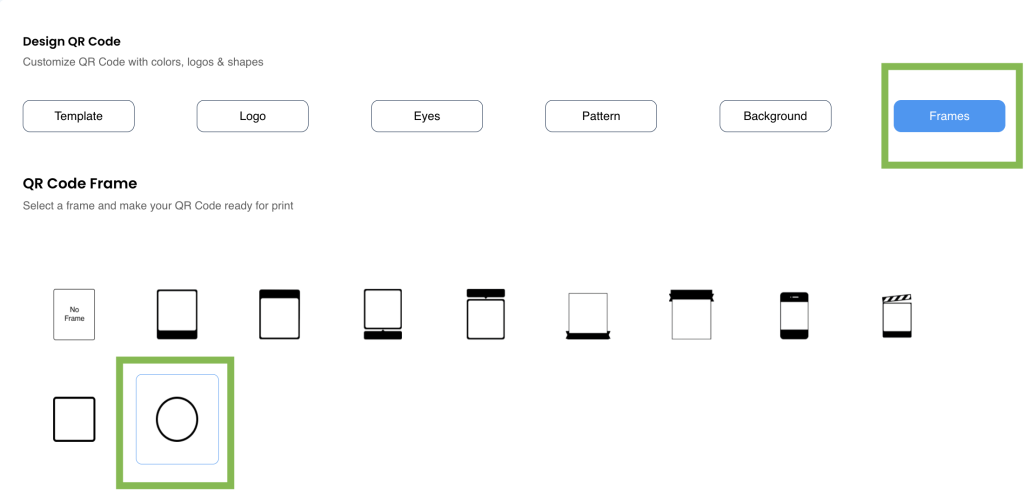
After creating your QR code, you can customize it. mobiQode allows you to add designs, logos, backgrounds, and frames. To design a circular QR code, select the ’round QR code’ template.
Method 1: Select a round QR code template directly (shown below).
Method 2: Select any template, then change the frame to circular in the “Frames” section during customisation.
5 Download Your QR Code
Once personalized, download your QR code in multiple file formats (SVG/PNG/JPG) and use it on all your marketing and promotional materials, both print and digital.
Designing Your Customizable Round QR Code: Top Tips
Here are the key tips to consider while designing your custom circle QR code:
Use colors
Most QR codes are black and white, but you can create colored QR codes. Choose a single color for the entire QR code or different colors for various parts. Select the color theme based on your brand strategy.
Use a high-contrast background
Keep the background and foreground of your round QR codes in contrast. QR code scanners may not recognize a code if the foreground and background colors are too similar. Some colors appear darker in print than on screen, so choose wisely.
Use call-to-action (CTA) stickers
Add CTA stickers with your round QR codes so viewers know what they’ll gain. Lines like “scan to get 10% off” or “scan to know more about our membership” help drive more scans and make the code more eye-catching.
Add a logo and branding
Adding a logo and using brand colors helps you stand out. Placing a logo in the center is a reliable way to attract more users — keep the logo to 20–30% of the code space to maintain scannability.
Optimize the shape
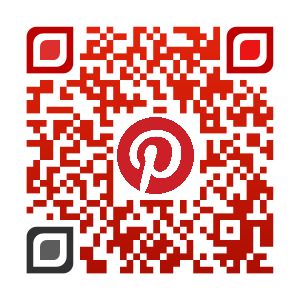
Try redesigning parts of your QR code to make it more attractive. Pinterest, for example, redesigned its QR code to be both visually appealing and easily scannable. Always test after reshaping to confirm it still works.
Maintain symmetry
Don’t overstretch or contract the actual code — this can make it unscannable. Keep proportions balanced.
Maintain a quiet zone
A blank area surrounding the QR code ensures accurate scanning. Keep a margin of at least 4 modules around the circular border to prevent interference from adjacent design elements.
Use high-quality file formats
For print, use vector-based SVG or high-resolution PNG files. Avoid low-quality or distorted images — blurred QR code patterns are difficult or impossible to scan.
Best Practices for Circle QR Code Design
Avoid over-customizing
Too much design can make the code hard to scan. Ensure sufficient contrast with the background and keep a clear quiet zone. Subtly add branding elements and always test on different devices.
Avoid common design mistakes
Don’t use inverted colors (light QR on dark background) — scanners are optimized for dark modules on light backgrounds. Avoid external images or complex graphics that can obstruct key elements.
Test your QR code
Always test after customization to confirm it scans correctly across various devices and apps. Focus on maintaining high contrast and a clear structure.
Ensure excellent scannability
Place it without distortion, select a contrasting background, and keep the design clutter-free.
Add a logo
A recognizable logo helps users quickly identify the QR code as legitimate, reducing concerns about scams. It provides extra branding that encourages more users to scan confidently.
Position the circle QR code correctly
Ensure your circular QR code is prominently displayed and not obstructed. Proper placement makes it easily accessible and increases the likelihood of engagement.
Design the QR code in the correct size
A QR code should be at least 1cm × 1cm. Use the 10:1 ratio formula to determine the optimal size for your use case.
Key Design Elements for Circle QR Codes
| Element | Purpose | Best Practice |
|---|---|---|
| Circular Frame | Improves visibility | Add CTA like “Scan Me” |
| Dot Pattern | Enhances circular design | Keep spacing clear |
| Central Logo | Boosts branding | Limit to ~20–30% of code area |
| Colors | Matches brand identity | Maintain high contrast |
| Quiet Zone | Ensures easy scanning | Keep proper spacing around code |
| Size | Affects usability | Minimum 2–3 cm for print |
| Error Correction | Improves scan reliability | Use higher levels with custom designs |
Use Cases of Circle QR Codes
Round QR codes have varied applications across different industries. Here’s how you can use them:
Product Packaging
Enhance visual appeal and give customers quick access to product info, nutritional details, or promotions.
Event Promotion
Feature on posters, flyers, and tickets. Use dynamic QR codes for detailed scan tracking and geo-location data.
Digital Business Cards
Add a modern flair to your digital business cards. Share contact info or link to social profiles.
Art & Creative Projects
Incorporate into artworks or installations. Link to digital content, artist bios, or behind-the-scenes videos.
Luxury Branding
Maintain an elegant aesthetic while offering digital engagement like exclusive content or loyalty programs.
Interactive Signage
Provide additional information at museums, galleries, or tourist attractions for enhanced visitor engagement.
Restaurant Menus
Link to digital menus, nutritional info, or ordering platforms to streamline the dining experience.
Educational Materials
Offer students supplementary content, interactive quizzes, or video lectures in textbooks.
Fashion & Apparel
Print on clothing tags or tote bags for styling tips, care instructions, or links to related products.
Real Estate Listings
Link to virtual tours, floor plans, or property details for a comprehensive view of listings.
Novelty Marketing
Stand out on billboards or digital signage, capturing attention for exclusive offers or information.
Where Circle QR Codes Perform Best
| Use Case | Key Benefit |
|---|---|
| Retail & Packaging | Blends with product design, boosts customer interaction |
| Events & Exhibitions | Attracts attention, drives attendee engagement |
| Digital Marketing | Enhances visual appeal of campaigns and social posts |
| Hospitality | Improves menus, displays, and check-in experiences |
| Personal Branding | Helps professionals stand out at networking events |
Common Mistakes to Avoid with Circle QR Codes
- Using low-contrast colors — makes the code difficult or impossible for scanners to read
- Overloading with design elements — complex graphics obstruct key data patterns
- Making the code too small — keep a minimum of 2 × 2 cm for reliable print scanning
- Ignoring testing before publishing — always test across multiple devices and apps
- Placing QR codes in hard-to-scan locations — avoid folds, curved surfaces, or low-light areas
Conclusion
Circle QR codes offer the same reliability as standard QR codes with a significantly more polished visual impact. They work across packaging, print, events, and digital campaigns — and when designed correctly, they enhance engagement without compromising scannability. mobiQode gives you the templates, customization options, and analytics to create circle QR codes that are both on-brand and performance-trackable, starting from $5/mo.
Ready to stand out with a unique circle QR code?
Start Your 14-Day Free Trial →Plans from $5/mo · No credit card required

