

Traditional QR codes cannot be changed once generated even if you need to modify or update any information. That’s where dynamic QR codes come in.
Dynamic QR codes allow you to update the linked information anytime, even after the code is printed or shared, keeping your content fresh and relevant. They are perfect for campaigns with frequently changing content and offer features like tracking and analytics for user engagement insights.
In this article, we take a look at everything about dynamic QR codes.
Video: How do dynamic QR codes work
What is a dynamic QR code
A dynamic QR code allows you to change the destination it points to even after the code has been created and distributed. These editable and trackable QR codes contain a short URL that redirects to a second URL, which can be updated as needed.
How do dynamic QR codes work
Dynamic QR codes use a redirect system through a short URL. Here’s how they function:
- Creation: Sign up with a QR code generator that supports dynamic QR codes and generate a new QR code
- Scanning: When a user scans the QR code with their smartphone or any QR code reader, it reads the encoded short URL
- Redirection: The encoded short URL acts as an intermediary. It redirects the user’s device to the actual destination URL that you’ve specified
- Updating the linked content: If you need to update the information linked to your QR code, you can simply log into your dynamic QR code generator tool and modify the destination URL settings. The short URL will then direct users to the updated content
- Tracking and analytics: Dynamic QR codes come with built-in tracking features. The short redirect URL tracks each scan, providing you with valuable insights into the effectiveness of your QR code campaigns
Examples of dynamic QR codes
Dynamic QR codes offer a flexible way to engage users with up-to-date information or content.
Here are some examples of how they’re used:
- Marketing campaigns: A dynamic QR code lets you change the link it sends to users based on when or where they scan it. For example, a QR code on a marketing flyer could send users to a local store locator during a promotional period
- Product packaging: A food company can use a dynamic QR code on its packaging to link to recipes or sustainability information about the product’s sourcing
- Event tickets: Event organizers can use dynamic QR codes on tickets that can’t be easily replicated, improving security and allowing for last-minute updates or changes
- Digital business cards: Dynamic QR codes can be embedded on your digital business card to help your target audience easily save your information
- App download QR codes: App developers can create a single dynamic QR code that redirects users to the right app store (Apple App Store or Google Play Store) based on their device’s operating system, promoting their app and increasing the number of downloads
Create Dynamic QR Codes With mobiQode
Start Free Trial →Benefits of dynamic QR codes
Dynamic QR codes come with several advantages over static ones:
- Editability: The biggest perk is the ability to modify information linked to the QR code without reprinting. Campaigns that run for a while or where the content might change can benefit from this aspect
- Tracking: With dynamic QR codes, you can track how many times the QR code is scanned, where the scans happen, and even the device used for scanning
- Cost-effective: By replacing printed instruction manuals with dynamic QR codes, businesses can provide digital manuals that are easy to access. You can update these QR codes anytime and link them to newer manuals, reducing printing costs and improving customer experience
- Faster scanning: Dynamic QR codes often scan faster than static QR codes as they use shortened URLs that are converted into less dense data patterns, making them easier for cameras and QR scanners to detect
- Branding: You can customize the design of your dynamic QR codes with your brand colors and logos, creating a more cohesive brand experience
- Multi-functional: Dynamic QR codes are multi-functional. You can combine two or more QR code solutions into a single code, such as time-bounded URLs and geo-specific websites
Static vs dynamic QR codes
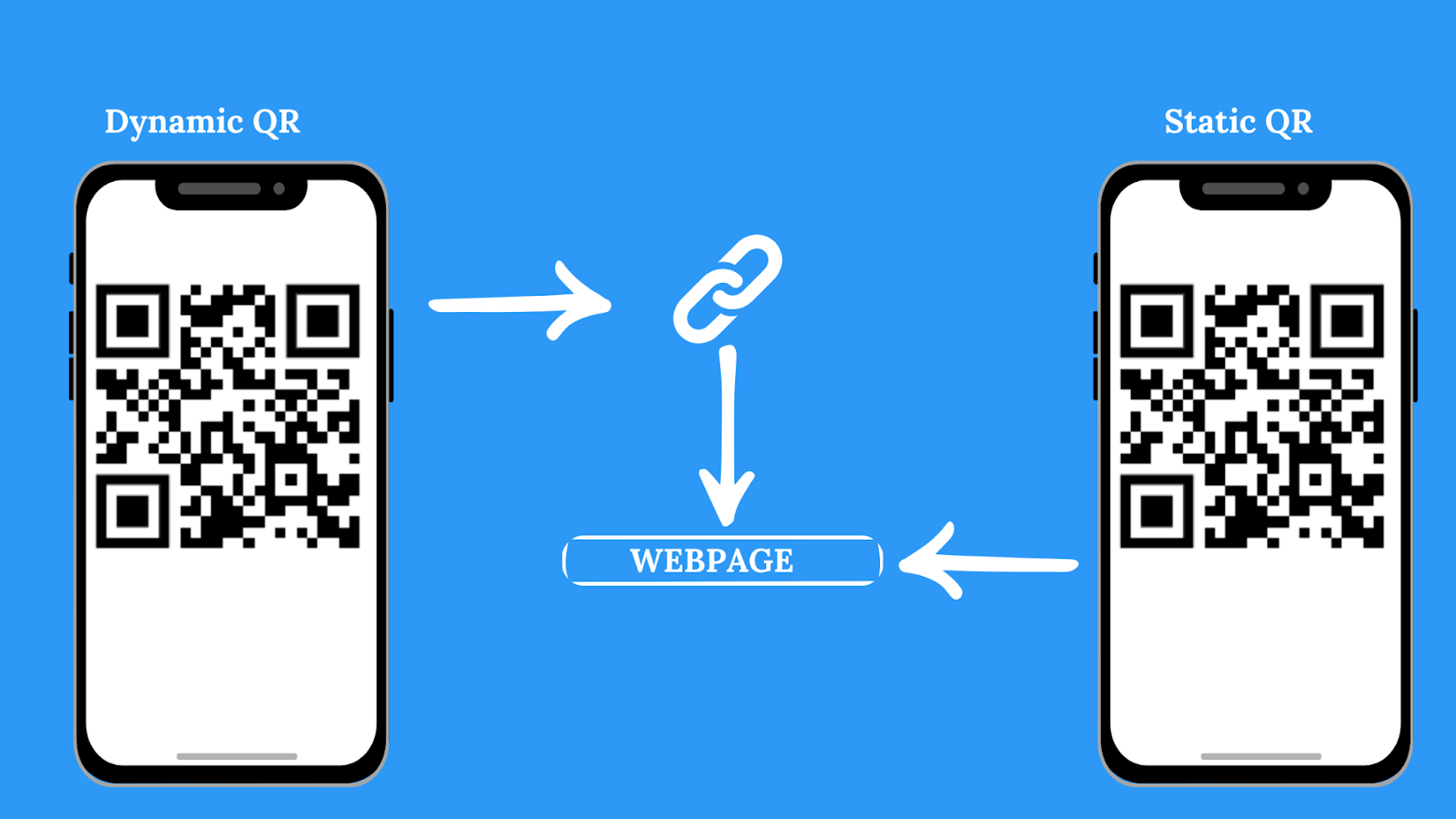
Here is a compilation of the major differences between a static and a dynamic QR code:
| Feature | Static QR code | Dynamic QR code |
|---|---|---|
| Editability | Not editable — requires a new QR code if content needs to change | Editable — the destination can be modified without regenerating the code |
| Tracking | No scan tracking capabilities | Offers scan tracking data (number of scans, location, time, device) |
| Flexibility | Limited — points to a single destination | Highly flexible — can redirect based on time, location, or scan count |
| Cost | One-time cost | Subscription-based (includes updates, analytics, and advanced features) |
| Security | Less secure — can’t be easily disabled | More secure — providers invest in security measures to safeguard data |
| Offline use | Works offline (if data is stored within the code) | May require internet connection for URL redirection |
| Customization | Limited design options | Highly customizable for a branded experience |
| Best for | Simple, one-time use cases | Marketing campaigns, product packaging, event ticketing |
What is a dynamic QR code generator
A dynamic QR code generator is a tool that allows you to create QR codes that can be edited and updated after they are created. These generators create codes that act as a link to a service that manages the actual content. Apart from creating QR codes, these generators also offer tracking and analytic capabilities to monitor all the essential scan metrics.
Here are some of its benefits:
- Multi-URL landing pages: You can build dedicated landing pages for each QR code packed with rich content, from informative text and captivating videos to downloadable PDFs and links to your social media profiles
- Dedicated dashboard: These generators have a centralized dashboard for managing all your QR codes, letting you view analytics, edit codes, and track performance metrics in one place
- High security: Some generators include security features like encryption and access controls. mobiQode’s QR code generator is GDPR compliant, which means all your sensitive information is protected and only authorized users can edit or access the QR code’s content
- Scalability: These generators are designed to scale with your business needs. Whether you are a small business or a large corporation, mobiQode’s QR code generator can accommodate varying volumes of QR codes and campaigns
- Cross-platform compatibility: The QR codes created by these generators can be scanned by a wide range of devices, including smartphones, tablets, and even some laptops
How to create your own dynamic QR code
Here’s a simple guide to creating your own dynamic QR code using mobiQode’s QR code generator:
Step 1: Visit mobiQode’s QR code generator
Visit the mobiQode website. You can sign up for a free account if you don’t already have one.
Step 2: Select the type of content
Choose the content you want the QR code to link to, such as a website URL or text. mobiQode’s QR code generator has around 12 different options, and you can choose the one that best fits your needs.
Step 3: Enter your content or link
Depending on the content type you selected, provide specific details like the website URL, text message, or file to be linked.
Step 4: Select the ‘Dynamic QR code’ option
Look for the ‘Dynamic QR’ option and select it.
Step 5: Customize the code (optional)
mobiQode allows you to customize the appearance of the QR code with your brand colors, logo, or add a call-to-action message.
Step 6: Save and download
Save the QR code by clicking on the ‘Save QR’ button, entering the QR name, and then clicking on ‘Save.’ Make sure to scan your QR code from different devices (iOS and Android) before using it.
Step 7: Track and update
Use the tracking features in mobiQode to monitor the performance of your QR code and update the content as needed. You can change the destination URL or content at any time without needing to create a new QR code.
mobiQode — Dynamic QR Code Generator
Start Free Trial →Tips to make your dynamic QR code marketing a success
Align with your marketing goals
Ensure that your dynamic QR code campaigns align with your overall marketing strategy. Define clear objectives, such as increasing website traffic, generating leads, or enhancing customer engagement. The QR code should guide users to content that supports these goals, providing a smooth experience that increases your return on investment (ROI).
Create engaging content
The content linked to your QR code should be engaging and valuable to your audience. Whether it’s a promotional offer, a video, or a detailed product description, ensure that it provides a good user experience. High-quality content can significantly increase the likelihood of users scanning your QR code and interacting with your brand.
Use clear call-to-action (CTA)
Incorporate clear and compelling CTAs alongside your QR codes. Phrases like ‘Scan to get 10% off’ or ‘Scan for exclusive content’ encourage users to take action. Unclear CTAs do not effectively convey what you want your target audience to do and can even hamper the growth of your marketing campaigns.
Optimize size and placement
Ensure that your QR codes are of appropriate size and placed strategically for easy scanning. The minimum recommended size is 0.8 x 0.8 inches, but it can be larger depending on the medium. Avoid placing QR codes on uneven surfaces that could distort their appearance, making them unscannable.
Test before launching
Conduct thorough testing of your dynamic QR codes before deploying them in your marketing materials. Your tests may include checking the functionality of the links, confirming the QR codes scan correctly across various devices, and verifying that the user experience is smooth post-scanning.
Utilize analytics for improvement
Use the tracking and analytics features of dynamic QR codes on mobiQode to monitor their performance. Analyze your data, such as scan locations, device types, and user engagement metrics. Use this information to refine your campaigns and make informed decisions about future marketing strategies.
Keep it fresh
Regularly update the content linked to your dynamic QR codes to keep your audience engaged. For example, you can change promotions or offers based on seasons or events. In this way, you can repurpose the same QR code for different campaigns without creating new ones.
Branding and design
Incorporate your brand elements, such as logos and colors, into the QR code design. A visually appealing QR code can enhance brand recognition, making users more likely to scan it. Experiment with shapes and styles to create a unique design.
Educate your audience
Provide clear instructions on using the QR code, especially if your target audience may need to become more familiar with scanning QR codes, preventing confusion and encouraging more users to engage with your content.
Promote across multiple channels
Use your dynamic QR codes across various marketing channels, including print ads, social media, email campaigns, and in-store promotions.
Create your own dynamic QR code with mobiQode
Create your dynamic QR codes with mobiQode’s QR code generator! Start your 14-day free trial today and see how easy it is to create and manage your QR code campaigns.
Dynamic QR codes are the future of offline-to-online marketing. Update once, reach everywhere — no reprinting required.
Founder, mobiQode
Create Dynamic QR Codes With Real-Time Analytics
Start Free Trial →14-Day Free Trial · Plans from $5/mo · No Credit Card Required

