
Ankita Saraswat
Founder, mobiQode
Registration shouldn’t be a barrier — it should be an invitation. QR codes eliminate long queues, reduce errors, and create a seamless first impression. When you make registration effortless, you set the tone for an exceptional experience from the very start.
Perfect QR Code Types for Registration

Website BEST
Link to registration forms and event sign-up pages

vCard
Quick attendee information capture and contact exchange

Simple Text
Display registration confirmation codes and instructions

Share event tickets, passes, and registration receipts

Business Page
Create event landing pages with integrated registration

Application
Direct users to download event or registration apps

Wi-Fi
Provide instant network access for registered attendees

Videos
Share registration tutorials and event preview videos

Social Media
Connect attendees to event communities and updates
Handling registrations can be inefficient — organisations often rely on lengthy links, paper forms, or manual data entry. That usually leads to mistakes like typos in emails, missing information, or forms getting lost.
A QR code for registration significantly simplifies the process. Users can scan the code with their smartphone and instantly access the registration form — reducing friction, eliminating unnecessary steps, and typically increasing registration rates.
Create Registration QR Codes — Start Free Trial
Create Registration QR Codes →How to Create a Registration QR Code
Create Your Registration Form
Create your registration form or page on platforms like Google Forms or your website.
Copy the Registration Link
Copy the shareable registration link.
Open the mobiQode QR Code Generator
Open the mobiQode QR code generator and click the “Create QR Code” button.
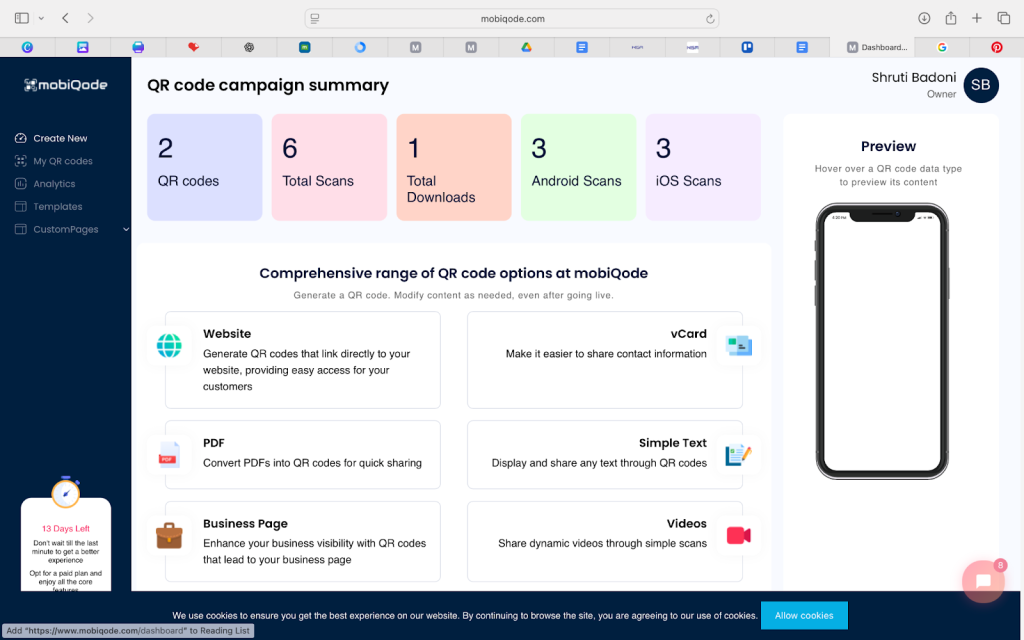
Select the URL QR Code Option
Select the URL QR code option — the right type for linking to a registration form.
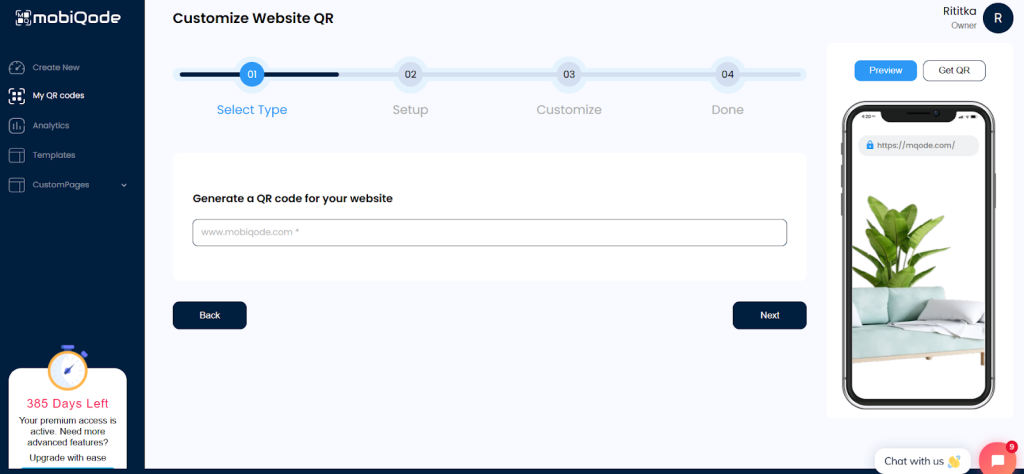
Paste the Registration Link
Paste the registration link into the generator and click “Next.”
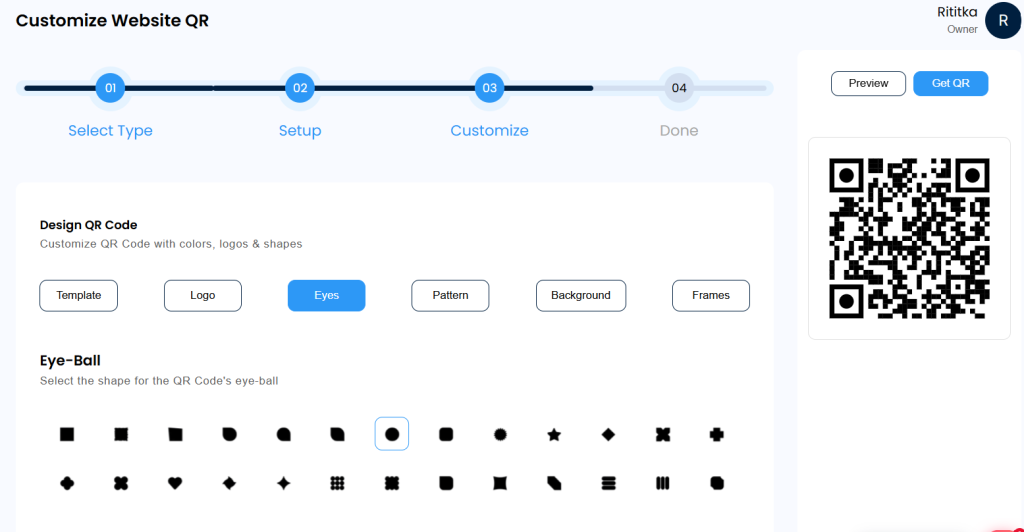
Customize the QR Code Design
Customize the QR code design with your company logo, colors, or patterns.
Generate and Download
Click “Generate” and the QR code will be created within 2 minutes. Download in PNG, JPG, or SVG format.
Share Your QR Code
Share it digitally or print it for your event materials.
Benefits of Using QR Codes for Registration
Easy Access with a Scan
Instead of manually entering long URLs or searching through emails, attendees scan a QR code in seconds. These are particularly effective at live events — place the code on posters, flyers, or entry banners and attendees can register immediately. Someone walking into a conference lobby can register by scanning the code at the entrance rather than waiting in sign-up queues.
Cross-Platform Accessibility
QR codes enable seamless access across multiple channels — integrated into emails, event pages, and social media, or included in printed materials such as flyers, badges, and invitations. One code works across everything, so you’re not creating duplicates and everyone gets a quick, streamlined registration experience.
Mobile-First Experience
QR codes make mobile-based registrations simple. Upon scanning, the registration page opens instantly on the user’s phone without requiring a desktop device. People can register while commuting, browsing social media, or spotting a code on a flyer.
Better Tracking
With dynamic QR codes, organizers can track scan volume, device type, and approximate location. This enables data-driven insights into which channels drove the most sign-ups, and makes planning elements like seating, handouts, and catering more efficient.
Advanced Privacy
Since you’re collecting personal details, ensuring data security is critical. A solid QR code tool will secure data through encryption. GDPR compliance demonstrates to users that you take their privacy seriously, making your event look more credible and trustworthy.
Top QR Code Registration Use Cases
Event Registration
Use a QR code for event registration on posters, brochures, and social media posts. Attendees can scan to register instantly, making event promotion more effective.
Workshop and Training Programs
Educators and trainers can use QR codes for seminars, online classes, or certification courses — ensuring participants don’t miss deadlines or forget details.
Conferences and Expos
Place QR codes at entry points or in marketing campaigns to simplify check-in and participant registration.
Contests and Giveaways
A QR code for registration can direct users to the entry form without manual submissions, reducing barrier-to-entry and increasing participation.
Business Networking
Companies can use QR codes to gather contact details at trade shows or networking events — replacing paper-based data collection with instant digital registration.
Non-Profits and Fundraising
Charities and NGOs can place QR codes on posters or in emails to collect volunteer sign-ups or event registrations quickly and efficiently.
Best Practices When Printing a Registration QR Code
Ensure Proper Size and Placement
Make it large enough for easy scanning. Avoid placing codes on folds, corners, or reflective surfaces that interfere with readability.
Add a Clear Call-to-Action
Include a short line such as “Scan to Register” so attendees immediately understand what the code is for.
Test Before Printing
Scan on multiple phones before sending to print — confirming functionality across device types and operating systems.
Use High-Resolution Formats
Export as SVG or high-resolution PNG to maintain clarity across all print sizes.
Choose Dynamic Codes for Flexibility
If the registration link might change after printing, use a dynamic QR code so you can update the destination without reprinting.
Keep Branding Consistent
Add your brand colors, frames, or patterns so the QR code feels like a natural part of your event materials.
Conclusion
QR codes are an effective tool for event organisers looking to speed up registration while improving the attendee experience. Dynamic QR codes allow registration forms to be updated even after materials have been printed, minimising reprint costs. Built-in tracking features enable organizers to monitor engagement, improve resource allocation, and make better decisions for future events. With mobiQode, creating branded, trackable registration QR codes takes minutes — whether you’re running a conference, fundraiser, or corporate event.
Ready to simplify your registration process?
Create Registration QR Codes →14-Day Free Trial · Plans from $5/mo · No Credit Card Required
Frequently Asked Questions
How do I create a QR code for event registration?
Create your event registration form and copy its link. Open mobiQode and select the URL QR code option. Paste the registration link, generate the QR code, and download it. Add it to posters, invitations, emails, or event pages. When people scan it, they are taken directly to the registration form.
Can I use the same QR code for multiple events?
Yes, but only with a dynamic QR code. With a dynamic code, you can update the destination URL from your mobiQode dashboard — reusing the same code for multiple events without creating a new one each time.
Can I track how many people registered via QR scan?
Yes, dynamic QR codes provide tracking capabilities — scan count, device types, and approximate locations. This helps assess campaign effectiveness and plan future events.
What happens if I need to change the registration form after printing?
With a static QR code, you would need to reprint. With a dynamic QR code from mobiQode, you can update the registration URL from the dashboard at any time — the printed code continues working as before.
Do registration QR codes work offline?
No, registration QR codes require an internet connection to open the linked form or webpage. However, once scanned, users can complete the process seamlessly if they have network access.