

“Will my QR code stop working one day?” This is a question many people ask themselves. Many assume QR codes are forever, but the truth is a bit more nuanced. Here, we will explain why QR codes may appear to “expire,” what really causes them to fail, and how you can create QR codes that last — including permanent QR codes you can even edit after printing.
Ever created a QR code that suddenly stopped working? It’s easy to assume that the QR code expired. But in most cases, that’s not true. QR codes can stop working for many reasons — the information linked to them may no longer be accessible, or the QR code generator used to create it might have stopped supporting it. Let’s look at the top reasons QR codes expire and the best ways to keep them working.
Types of QR Codes
Before we talk about expiry, it helps to understand the two main types of QR codes and how they work differently.
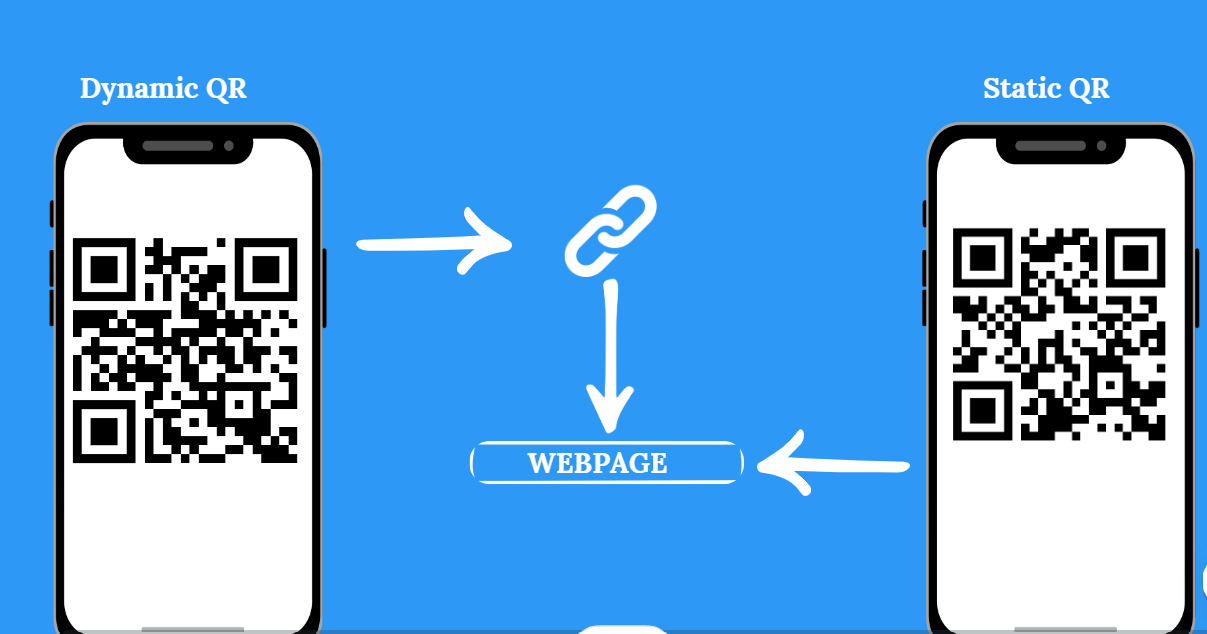
Static QR Codes
Encode the full data (e.g., a URL) directly into the QR itself. Once generated, the content is fixed and cannot be changed. Any updates require regeneration and reprinting. Best for payment links, one-time campaigns, or permanent information.
FIXED · CANNOT EDITDynamic QR Codes
Encode a short redirect link that points to the actual content. You can change where it redirects at any time without reprinting the code. Track scans, change destinations, and manage campaigns — all from your dashboard.
EDITABLE · TRACKABLEBecause dynamic QR codes use a redirect, they depend on the service or server that hosts that redirect. If that service is turned off, the QR stops working. Dynamic QR codes can be used to track inventory, create contactless menus, or display time-sensitive information like event tickets. You can edit the data linked to a dynamic QR code through the QR code generator you used to create it.
QR codes themselves do not have a built-in expiry date. But they can become inactive depending on what supports them.
Why Do QR Codes “Expire”?
The main reasons QR codes stop working or appear to expire are as follows:
Link or content is removed or broken
If your QR code points to a web page that gets deleted or moved, scanning it will lead to 404 errors or broken pages. The QR itself is fine — it’s the destination that broke.
Service or subscription deactivated
With dynamic QR codes, if the platform or subscription backing the redirect is canceled, your QR code can become inactive immediately.
Scan limits reached
Some providers impose limits on how many times a dynamic QR can be scanned. After the limit is hit, the code might stop redirecting entirely.
Platform or provider shutting down
If the service you used changes terms, discontinues your account, or imposes new rules, QR codes created through them may cease functioning without warning.
Physical damage or low print quality
On printed materials, QR codes may get scratched, distorted, or become too small or faint to scan reliably. Always use high-resolution exports and protect printed codes from wear.
Do Static QR Codes Expire?
No — that is the short answer. Static QR codes do not expire on their own, since the data is embedded directly into the code. However, they can stop working under certain conditions:
1. The URL or file they link to is taken down or removed
2. The content is changed without updating the QR code
3. There is damage or distortion in the printed QR
So the “expiry” is not of the QR code itself, but of the linked destination. While static QR codes don’t expire, the information they link to can become outdated. If the linked content in a static QR code changes or gets removed, you will have to regenerate it to reflect those changes.
Video — Why Do QR Codes Expire?
Do Dynamic QR Codes Expire?
Dynamic QR codes can become unusable under certain conditions, though well-managed platforms can avoid that. Canceling your QR code generator’s subscription can also cause your dynamic QR codes to stop working. Here is when dynamic codes typically “expire”:
| Condition | What Happens |
|---|---|
| Subscription ends or expires | Redirects fail; QR no longer leads to your content |
| Scan limit exceeded | The code may no longer respond after a set threshold |
| Provider discontinues services | QR becomes dead — no more redirect possible |
| Account deleted or suspended | All associated QR codes may be disabled immediately |
| Linked content deleted or moved | Scanning leads to a 404 error or broken page |
Good QR services help avoid these issues by offering permanent dynamic QR codes with lifetime guarantees and high uptime — so you never get a surprise expiration.
How mobiQode Ensures QR Codes Don’t Expire
mobiQode is built specifically to address and prevent QR code expiry issues. Here is how:
Never Expire
QR codes created via mobiQode are designed to never expire — you do not lose them even after years of use.
Always Editable
Dynamic QR codes remain editable — change the target URL any time without reprinting the code.
Unlimited Scans
No scan limits or forced timeouts. Full analytics, geo-location tracking, and customisation included.
99.9% Uptime
High reliability ensures your QR codes stay live. Even if you change content, the same QR keeps pointing to the updated location.
How to Create a QR Code That Doesn’t Expire
1 Choose a Reliable QR Code Generator
Use reliable QR code generators that create QR codes without any limitations. There should be no scan limits or time limits on the QR codes generated. Apart from reliability and high uptime, here’s what to look for:
Fully customizable — Customize style, colors, add your logo, and align QR codes with your brand identity.
Multi-URL landing pages — Direct users to different web pages through a single QR code.
Dynamic codes — Make changes anytime without fear of codes expiring or needing to reprint.
Scan analytics — Monitor usage data; a drop to zero might mean something has gone wrong.
2 Generate the QR Codes
Decide what information you want to encode — a website URL, contact details, plain text, images, or videos. Customize the QR code style and colors to match your brand, then download it as an image file at the highest resolution available.
3 Manage the QR Codes
QR code generators like mobiQode allow you to edit QR codes after generation and track usage analytics. You can check how many people have scanned the QR codes, where they are scanning from, and update the content whenever needed — all without changing or reprinting the QR code itself.
Best Practices to Keep QR Codes Alive
You must take some proactive measures to avoid any “expired” QR codes. Here are the most important ones:
Scheduled Maintenance
Set calendar reminders to periodically review the data linked to your QR codes. Identify and address potential issues before users encounter them. Watch usage data — a drop to zero might mean something went wrong.
Offline Backup
If your dynamic QR code links to a critical document or resource, create an offline backup. You can also generate a separate QR code linked to that backup to ensure continuous access if the primary source goes down.
Opt for a Subscription Model
Avoid free QR code generators that might deactivate codes after a certain period. Look for subscription-based tools offering non-expiring QR codes. Keep an eye on your subscription and enable automatic renewals to avoid lapses.
Print Carefully
Use high-quality printing, ensure sufficient size, and protect printed QR codes from wear and tear. Scratched or distorted codes may fail to scan reliably even if the digital link is still active.
Keep Your Redirects Active
Make sure the URL or content behind the QR remains live and accessible. For critical resources, host multiple versions or mirrors so QR links never point to dead ends.
Generate QR Codes That Never Expire
To ensure your codes function smoothly for a long time, choose a reliable QR code generator like mobiQode. We offer always-up, highly reliable, and fully customizable QR codes you can edit anytime.
Ready to create QR codes that never expire?
Start Your Free Trial →No credit card required · No scan limits
Conclusion
QR codes do not expire on their own. What happens is that they can stop working if their linked content disappears or their supporting service stops.
Static QR codes embed data directly and last indefinitely as long as the destination remains active. Dynamic QR codes offer flexibility and editing, but they depend on the reliability of the QR platform behind them.
With mobiQode, you get QR codes that never expire — with editing, analytics, high uptime, and lifetime guarantees. That means your QR links stay dependable for years, without the worry of expiration surprises.
Frequently Asked Questions
- If the content is outdated, update it through your QR code generator
- If your generator no longer supports it, switch to a reliable tool like mobiQode that offers non-expiring QR codes
- If the problem is a subscription lapse, renewing your account often restores the code immediately

